GW2 Learn How to Dodge: The Complete Guide to Mastering Dodge in Guild Wars 2
If you’ve just started playing Guild Wars 2 — or you’ve been playing for a while and still find yourself eating every attack — learning how to dodge is the single most impactful skill you can develop. Unlike traditional MMOs where surviving is mostly about having the right gear or talent builds, GW2 places dodging at the absolute center of combat. It’s not optional. It’s not a bonus. It’s the game’s core survival mechanic, and once you genuinely understand it, everything else clicks into place.
This guide covers everything: what dodging means in GW2, how the system works mechanically, where to learn it in-game, when and why to dodge, how it differs across professions, and advanced techniques most players never discover.
What Is Dodge in Guild Wars 2?
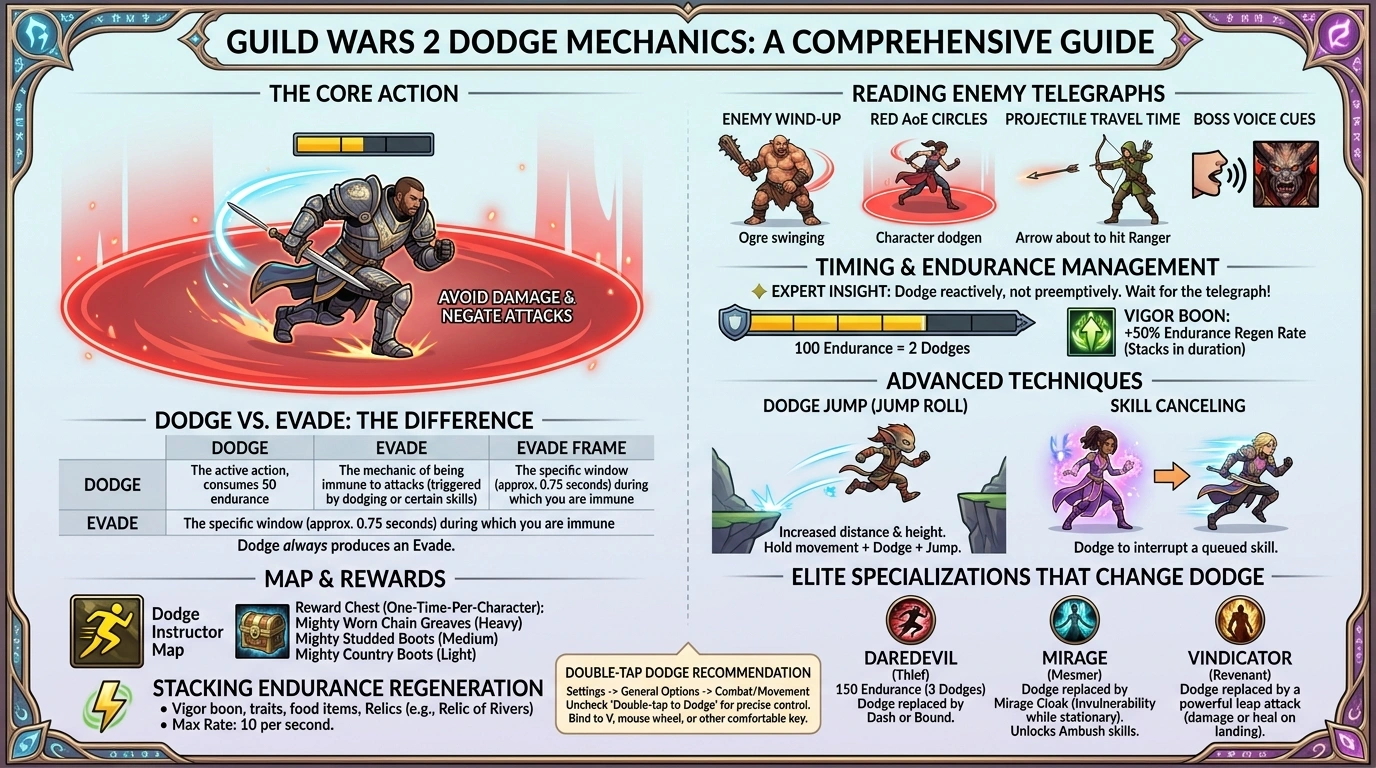
Dodge is an innate movement ability available to every player character in Guild Wars 2. When you execute a dodge, your character performs a short evasive roll that repositions them and grants a brief window of complete invulnerability to incoming attacks. During that window — called an evade frame — projectiles, area-of-effect attacks, traps, and direct strikes all pass through you without dealing damage.
This is fundamentally different from most MMORPGs where defense is a passive stat. In GW2, you actively decide when to be invulnerable. That’s both a massive amount of power and a significant responsibility.
Key Concept: The word “Evaded!” appears on screen in white text when you successfully dodge an incoming attack. Your attacker also sees it in red — confirmation that your timing was perfect.
Who Invented / Designed the Dodge System?
The dodge mechanic was designed by ArenaNet, the developer behind Guild Wars 2. The game launched in August 2012, with dodge built into the combat system from the very start as a deliberate departure from tab-targeting MMO conventions. ArenaNet’s design philosophy was to make skill, timing, and awareness matter more than raw stats — dodge is the clearest expression of that philosophy.
Interestingly, early test builds of Guild Wars 2 did not have the full evade mechanic. In those versions, dodging simply moved the character backward (a “retreat”) without granting any invulnerability frames. The true evade system — where you actually avoid all incoming damage — was added before launch and became one of the game’s defining features.
The Dodge Instructor system — dedicated NPCs in each starting zone to teach new players the mechanic — was added later as part of the September 2014 Feature Pack, reflecting ArenaNet’s acknowledgment that the system needed better onboarding for new players.
How Dodging Works: The Mechanics Explained
The Endurance Bar
Every character in GW2 has an Endurance resource, displayed as a yellow bar positioned just above your health orb at the bottom center of the screen. Understanding endurance is the foundation of mastering dodge.
| Stat | Default Value |
|---|---|
| Maximum Endurance | 100 |
| Endurance cost per dodge | 50 |
| Maximum consecutive dodges | 2 |
| Base endurance regen rate | 5 per second |
| Maximum endurance regen rate | 10 per second |
| Dodge travel distance | 300 units |
| Dodge duration | 0.75 seconds |
Because each dodge costs 50 endurance and the cap is 100, most characters can dodge twice before needing to wait for recharge. This makes endurance management a skill in itself — burning both dodges at once on minor attacks can leave you completely vulnerable when a big hit comes.
The one exception is the Daredevil (Thief elite specialization), which raises the endurance cap to 150, allowing three consecutive dodges — a significant survivability advantage.
How to Execute a Dodge
There are four ways to dodge in GW2:
- Press V (the default dedicated dodge keybind)
- Double-tap any movement key (W, A, S, or D) — this can be disabled in General Options
- Click the upper half of your health orb
- Click the endurance bar above your health orb
The direction of your dodge is determined by whichever movement key you’re holding at the moment of activation. If you hold no movement key, your character dodges backward by default.
Pro Tip: Many experienced players recommend rebinding dodge to your mouse wheel (scroll down = dodge). This frees up your fingers for movement keys and makes it dramatically easier to dodge while strafing. Also consider disabling double-tap to dodge to prevent accidental rolls during jumping puzzles.
What Blocks Your Dodge
Several conditions and control effects prevent you from dodging:
- Being Immobilized
- Immediately after being Knocked Back
- While under the effects of Fear
- When your endurance is fully depleted (your character will shout a line depending on race/gender — for example, a Human male says “I’m out of endurance!”)
Where to Learn Dodge in GW2: The Dodge Instructor
What Is the Dodge Instructor?
Dodge Instructors are NPCs in Guild Wars 2 that teach players how to dodge and evade traps and attacks. They are located in each starting zone, marked by a yellow dodging man icon on the map, next to a chest guarded by traps.
This is GW2’s built-in tutorial system for the dodge mechanic, and it’s the first place every new player should go. The tutorial is hands-on: you physically practice dodging through trap-guarded rings to reach a reward chest.
All Dodge Instructor Locations
| NPC Name | Area | Zone |
|---|---|---|
| Lucas | Shaemoor Fields | Queensdale (Human starting zone) |
| Corrcus Vengefur | Lake Feritas | Plains of Ashford (Charr starting zone) |
| Daav | Outcast’s Cleft | Wayfarer Foothills (Norn starting zone) |
| Aelann | Morgan’s Spiral | Caledon Forest (Sylvari starting zone) |
| Motwitt | Jeztar Falls | Metrica Province (Asura starting zone) |
| Kai | Training Grounds | Seitung Province (Canthan/EoD starting zone) |
Each instructor is marked by a yellow dodging man icon on the map. You don’t need to be on a new character to visit them — any character can interact with a Dodge Instructor and practice the tutorial.
Rewards from the Dodge Tutorial
Completing the dodge tutorial earns you a reward chest containing a basic quality footwear item, which varies based on your character’s armor class:
| Armor Class | Reward Item |
|---|---|
| Heavy (Warrior, Guardian, Revenant) | Mighty Worn Chain Greaves |
| Medium (Ranger, Thief, Engineer) | Mighty Studded Boots |
| Light (Elementalist, Mesmer, Necromancer) | Mighty Country Boots |
Note: The reward chest is available once per character. If you visit a second Dodge Instructor on the same character, the chest will already be open. The map icon disappears after looting.
When to Dodge: Timing Is Everything
This is where most players struggle. Knowing how to dodge is easy. Knowing when is an art form developed through hundreds of hours of play. Here’s a framework:
Reading Enemy Telegraphs
GW2 uses a visual telegraph system to signal incoming attacks:
- Red AoE circles or cones appear on the ground before an attack lands — dodge out of these
- Enemy wind-up animations precede heavy hits — watch for the animation, not just the circle
- Projectile travel time — for ranged attacks, dodge just before the projectile arrives, not when it’s fired
- Boss voice cues — many bosses have audio lines that correspond to specific abilities
Expert Insight: If the enemy is melee, dodge immediately when it gets in range rather than waiting for the animation, as it may be too late by then. If the enemy is ranged, keep moving — dodging too liberally burns endurance that you’ll need to avoid stronger attacks.
The Timing Window
To successfully time an evasion, you need to predict the instant at which the attack will hit you. The “Evade” duration listed on your skill is the time during which you have to activate the skill before you expect the hit to land. The shorter that time, the longer you must wait until the hit has almost landed before dodging.
This is the counter-intuitive part: dodging too early is just as bad as dodging too late. If you dodge the moment an enemy starts their animation, you’ll finish your roll before the attack even lands.
Endurance Management Strategy
Think of your two dodges like a limited resource that recharges over time:
- Save at least one dodge for emergency situations — a full endurance bar that you’re sitting on out of caution is wasted potential, but zero dodges during a boss AoE is a death sentence
- Don’t panic-dodge — the instinct to mash V when in danger burns both dodges instantly and leaves you completely exposed
- Dodge reactively, not preemptively — wait for the telegraph, then respond
Why Dodging Is So Important in GW2
The philosophy behind GW2 combat is unique in the MMO genre. Guild Wars 2 combat relies much more on skill than on stats or RNG, since there is no endless gear grind and thus not necessarily a stat difference. Elements such as dodging, blocking, or evading are not number-based chances tied to your character — these abilities can be activated by the player when needed.
This means that a well-executed dodge can completely negate any attack in the game, regardless of your gear level. A fresh level-1 character can dodge a max-level boss attack just as effectively as a fully geared veteran — because it’s a player skill, not a character stat.
This has several practical implications:
- Dodging reduces your need for defensive gear, freeing you to run damage-oriented builds
- Perfect dodge timing can save runs in group content (raids, fractals, strikes)
- In PvP and WvW, dodge timing separates average players from skilled ones more than any other factor
- The boon Vigor stacks in duration and increases the rate of endurance regeneration by 100%, allowing for more frequent dodges — a very helpful boon to increase survivability, especially if you feel like you run out of dodges often.
Dodge vs. Evade: What’s the Difference?
Players often use “dodge” and “evade” interchangeably, but in GW2 they have distinct meanings:
| Term | Definition |
|---|---|
| Dodge | The active action of pressing the dodge key and consuming 50 endurance |
| Evade | The mechanic of being immune to attacks — a state triggered BY dodging, but also by certain skills |
| Evade Frame | The specific window (approx. 0.75 seconds) during which you are immune to incoming attacks |
Some skills grant evasion without costing endurance — these are particularly valuable because they let you dodge-equivalent without burning your endurance pool. Examples include certain Thief skills, Ranger survival skills, and specific weapon abilities across all professions.
The key distinction: you can be evading without dodging, but dodging always produces an evade.
Dodge Mechanics by Profession: How Each Class Is Different
While the base dodge system is the same for all professions, several elite specializations fundamentally modify how dodging works. This is one of GW2’s deepest layers.
Standard Dodge Professions
Most professions use the default dodge (300 unit roll, 0.75s evade frame), but have traits that trigger effects when you dodge:
| Profession | Notable Dodge Trait | Effect |
|---|---|---|
| Guardian | Selfless Daring | Heals nearby allies at the end of your dodge roll |
| Warrior | Reckless Dodge | Damages nearby foes at the end of a dodge roll |
| Ranger | Evasive Purity | Cleanses a condition on dodge; heals if a condition was cleansed |
| Thief | Uncatchable | Leaves caltrops behind when you dodge |
| Elementalist | Evasive Arcana | Casts a skill based on your attunement when you dodge |
| Necromancer | Mark of Evasion | Leaves a Mark of Blood on the ground when you dodge |
| Mesmer | Deceptive Evasion | Creates a clone at your current position when you dodge |
Elite Specializations That Change Dodge Entirely
Some elite specs transform the dodge action into something completely different:
Daredevil (Thief):
- Endurance cap raised to 150 — three dodges before recharging
- Dodge can be replaced by Bound (explosive slam) or a long-range Dash depending on traits
- Significantly stronger dodge identity than any other spec
Mirage (Mesmer):
- Dodge is replaced by Mirage Cloak — you stop moving but gain an invulnerability effect
- Unlocks Ambush skills during the evade window
- Unique in that you can dodge while stationary
Vindicator (Revenant):
- Dodge is replaced by a powerful leap from above that deals damage on landing
- Can be modified to heal allies instead of damaging foes
- Costs significantly more endurance than a standard dodge
Advanced Dodge Techniques
Dodge Jump (Jump Roll)
Dodge jump (or jump roll) is a technique used to achieve greater height and distance compared to a regular jump. This is accomplished by pressing the dodge and jump keys simultaneously. This can be particularly useful for jumping puzzles and PvP game modes.
This is a movement tech that most players discover by accident. The combined momentum of the dodge roll and the jump arc creates distance and height that neither action produces alone — useful for reaching ledges or crossing gaps.
Skill Canceling with Dodge
Dodging is one of the ways to cancel a skill during its activation time — for example, interrupting a queued auto-attack or preventing oneself from wasting a skill with an accidental button press.
This has a practical application in competitive play: if you accidentally queue a high-cooldown skill at a bad moment, you can dodge to interrupt it before it fires, preserving the skill for when you actually need it.
Stacking Endurance Regeneration
Endurance recharges at a base rate of 5 endurance per second, which can be increased up to a maximum rate of 10 endurance per second. A number of skills, traits, and food items restore endurance or increase its regeneration rate.
Ways to boost endurance recovery:
- Vigor boon: +50% regen rate (stacks in duration)
- Certain traits (Natural Vigor, Adrenal Implant, etc.)
- Food items with endurance restoration on dodge or on kill
- Relics like Relic of Rivers (grants alacrity and regeneration at dodge end)
Double-Tap Disable Recommendation
Some keyboards react to key presses more easily, sometimes resulting in unintentionally dodging. It is advisable to disable double-tapping when precise movement is required, such as attempting jumping puzzles.
Go to Settings → General Options → Combat/Movement and uncheck “Double-tap to Dodge.” Bind your dodge to V, your mouse wheel, or another comfortable key instead. You’ll have far more precise control.
The “Learn to Dodge” Achievement and Map Completion Issue
One notable issue that veteran GW2 players have flagged on the official forums involves the Dodge Instructor NPC and map completion. The Dodge Instructor’s area in certain starting zones counts as a point of interest or discovery landmark. New players who haven’t yet looted the chest may find the dodge instructor icon interfering with their sense of what’s been explored.
The key facts to know:
- The dodge map icon disappears once you loot the chest
- The achievement “Complete the dodge tutorial” is part of the Beginner Experience Collection
- Each starting zone has one Dodge Instructor, and the chest is one-time-per-character
- You can always revisit a Dodge Instructor to practice without re-earning the reward
Common Dodge Mistakes and How to Fix Them
| Mistake | Why It’s Harmful | Fix |
|---|---|---|
| Panic-dodging both charges at once | Leaves you with zero endurance during critical moments | Train yourself to use one dodge, then reassess |
| Dodging too early | The evade frame ends before the attack lands | Watch the animation fully before committing |
| Never dodging at all | Relying entirely on healing or armor | Start small — dodge red AoE circles in open world |
| Always dodging backward | Puts you out of attack range unnecessarily | Dodge toward the enemy’s flank to stay in melee range |
| Ignoring Vigor uptime | Missing out on faster endurance regen | Look for Vigor sources in your build |
| Double-tap dodge during jumping puzzles | Causes accidental mid-jump rolls | Disable double-tap to dodge in settings |
Frequently Asked Questions (FAQs)
Q: What key is dodge in Guild Wars 2?
The default dodge key is V. You can also double-tap any movement key (W/A/S/D) or click the upper portion of your health orb. It’s recommended to rebind dodge to your mouse scroll wheel for more fluid combat.
Q: How do I see the endurance bar?
The endurance bar is the yellow segmented bar directly above your health orb at the bottom center of your screen. Each filled segment represents 50 endurance — one dodge charge.
Q: Can I dodge in every direction?
Yes. Hold a movement key while pressing dodge to roll in that direction. If you press no movement key, your character rolls backward by default. Sideways dodges are especially useful to maintain positional advantage.
Q: What happens if I try to dodge with no endurance?
Your character will call out a line (such as “Not enough endurance!” or “I don’t have enough energy!”) and the dodge will fail. The exact line varies by race and gender.
Q: What is the difference between dodge and evade?
Dodge is the action (pressing the key, consuming endurance). Evade is the resulting state of invulnerability. Some skills grant evade frames without requiring you to dodge — these save your endurance for when you truly need it.
Q: Does gear affect how good my dodge is?
The base dodge mechanic is identical for all characters regardless of gear. However, certain traits, relics, foods, and boons can improve your dodge’s secondary effects or speed up endurance recovery.
Q: Can I dodge during skill animations?
Yes. Dodging during a skill’s activation time cancels the skill. This is a feature, not a bug — it lets you abort an accidental button press before the skill fires.
Q: Which profession has the best dodge in GW2?
The Daredevil (Thief elite spec) has the strongest dodge identity: 150 max endurance (three charges), and the option to replace the standard dodge roll with a long-range Dash or an explosive Bound attack. Mirage (Mesmer elite spec) is unique for allowing dodges while stationary.
Q: How do I improve my dodge timing?
Practice in open world against clearly telegraphed enemies. Watch the enemy’s animation begin, count a half-second mentally, then dodge. Over time, reading those animations becomes second nature. Low-level fractals are also excellent practice environments.
Q: Does dodging work underwater?
Yes, but note that the double-tap mechanic does not include Swim Up and Swim Down — only horizontal directional keys can trigger double-tap dodge underwater.
.