How Much Does It Actually Cost to Automate Customer Support?
You’re tired of your support team drowning in the same questions day after day. You’ve heard automation can help, but you’re wondering: “What’s this actually going to cost me?”
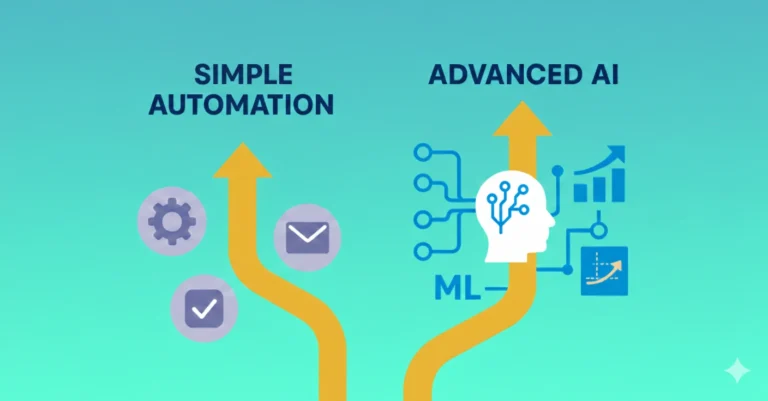
The answer isn’t simple because “customer support automation” ranges from completely free tools handling basic FAQs to $50,000+ enterprise AI systems managing millions of conversations.
That’s like asking “How much does a vehicle cost?” You could buy a bicycle for $200 or a Ferrari for $300,000. Both get you from point A to point B, but they serve very different needs.
Here’s what you need to know: 68% of consumers prefer to use self-service tools for simple customer service questions, according to Zendesk research. Yet many businesses hesitate because they assume automation is expensive or complicated.
The reality? You can start automating customer support for literally $0 and scale up as you grow. This article breaks down exactly what you’ll pay at each level—and more importantly, what you’ll save.
Understanding the Cost to Automate Customer Support
Before diving into specific numbers, let’s understand the four tiers of customer support automation:
Tier 1: Free Solutions ($0/month)
What you get:
- Basic chatbot functionality
- Limited FAQ automation
- Simple conversation flows
- Basic analytics
- Community support only
Best for: Very small businesses, testing automation concept, minimal support volume
Limitations: Branded widgets, conversation caps, limited integrations
Tier 2: Starter Plans ($25-100/month)
What you get:
- Unbranded widgets
- Extended FAQ coverage
- Email integration
- Basic AI capabilities
- Standard support
- Simple integrations
Best for: Small businesses, 100-500 monthly support inquiries, single-channel focus
Limitations: Conversation limits, fewer customization options, limited AI training
Tier 3: Professional Plans ($100-500/month)
What you get:
- Advanced AI and NLP
- Multi-channel support
- CRM integration
- Custom branding
- Priority support
- Analytics and reporting
- Team collaboration features
Best for: Growing businesses, 500-5,000 monthly inquiries, multi-channel needs
Limitations: Still some feature restrictions, may have conversation tiers
Tier 4: Enterprise Solutions ($500-5,000+/month)
What you get:
- Custom AI training
- Unlimited conversations
- Advanced integrations
- Dedicated account management
- White-label options
- Service level agreements (SLAs)
- Advanced security and compliance
Best for: Large companies, 5,000+ monthly inquiries, complex requirements
Limitations: Cost, implementation complexity, ongoing maintenance needs
Platform-by-Platform Cost Breakdown
| Platform | Free Tier | Starter Plan | Professional Plan | Enterprise Plan | Best For |
| Tidio | ✓ (50 chats/mo) | $29/mo | $289/mo | Custom | Small e-commerce |
| Zendesk Chat | 14-day trial | $14/agent/mo | $49/agent/mo | $99/agent/mo | Established support teams |
| Intercom | 14-day trial | $74/mo | $395/mo | Custom pricing | SaaS companies |
| HubSpot | ✓ (Unlimited) | $45/mo | $800/mo | $3,200/mo | Marketing-focused businesses |
| Drift | Limited free | $400/mo | $1,500/mo | Custom | B2B sales teams |
| ManyChat | ✓ (1,000 contacts) | $15/mo | $145/mo | Custom | Social media-focused |
| Freshdesk | ✓ (10 agents) | $15/agent/mo | $49/agent/mo | $79/agent/mo | Customer service teams |
| Tawk.to | ✓ (Unlimited) | ✓ (Always free) | ✓ (Always free) | Paid agents only | Budget-conscious businesses |
The Complete Cost Picture: Beyond Monthly Fees
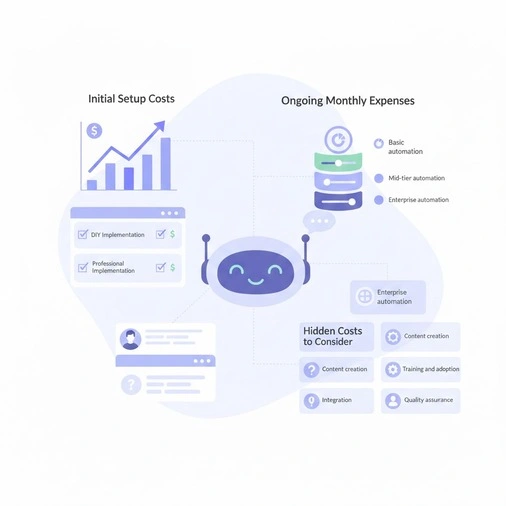
When calculating automation costs, monthly platform fees are just the beginning. Here’s what you actually need to budget:
Initial Setup Costs
DIY Implementation (Self-Service):
- Platform subscription: $0-100/month
- Your time investment: 10-40 hours ($0 if doing yourself, $500-4,000 if hiring help)
- Initial FAQ content creation: 5-15 hours
- Testing and refinement: 5-10 hours
Total DIY setup cost: $0-4,100
Professional Implementation:
- Consultant/agency fees: $2,000-15,000
- Platform onboarding: Usually included in subscription
- Custom integration development: $1,000-10,000 (if needed)
- Training materials creation: $500-2,000
Total professional setup: $3,500-27,000
Ongoing Monthly Expenses
Software subscription breakdown:
Basic automation stack ($50-150/month):
- Chatbot platform: $29-79/month
- Email automation for follow-ups: $15-50/month
- Analytics tool: $0-20/month
Mid-tier automation ($300-800/month):
- Advanced chatbot with AI: $149-399/month
- CRM integration: $50-100/month
- Multi-channel messaging: $50-100/month
- Enhanced analytics: $50-200/month
Enterprise automation ($1,000-5,000+/month):
- Enterprise chatbot platform: $500-2,000/month
- Advanced AI/NLP capabilities: $200-1,000/month
- Multiple integrations: $100-500/month
- Dedicated support: $200-1,500/month
Hidden Costs to Consider
Content creation and maintenance:
- Initial FAQ development: $500-2,000 (one-time)
- Monthly content updates: $100-500/month
- Seasonal/promotional updates: $200-800/quarterly
Training and adoption:
- Team training on new system: $500-3,000 (one-time)
- Ongoing training for new hires: $100-300/employee
- Change management consulting: $2,000-10,000 (optional)
Integration and customization:
- API development: $1,000-10,000 (if custom work needed)
- Data migration: $500-5,000 (one-time)
- Custom workflows: $500-3,000 per workflow
Quality assurance:
- Monthly conversation review: 5-10 hours of staff time
- A/B testing initiatives: $200-1,000/month
- Customer feedback analysis: 3-5 hours weekly
Real-World Cost Examples: Three Business Scenarios
Scenario 1: Local Coffee Shop Chain (3 Locations)
Business profile:
- 150-200 customer inquiries monthly
- Most questions about hours, menu, catering
- Budget-conscious, tech-savvy owner
Automation solution chosen:
- Platform: Tawk.to (free) + ManyChat for Instagram (free tier)
- Implementation: DIY over two weekends
- Setup: Basic FAQ chatbot on website + Instagram auto-responses
Costs breakdown:
- Setup: $0 (owner’s time)
- Monthly: $0 (using free tiers)
- Annual total: $0
Results after 6 months:
- 73% of routine questions automated
- 12 hours monthly saved (owner’s time)
- Value of time saved: ~$3,600/year at $25/hour
ROI: Infinite (no investment, positive time savings)
Scenario 2: Growing SaaS Company (50 Employees)
Business profile:
- 2,000-3,000 support tickets monthly
- Mix of technical and billing questions
- 5-person support team
Automation solution:
- Platform: Intercom (Professional plan)
- Implementation: Combination of internal team + consultant
- Features: AI chatbot, help center, in-app messaging, CRM integration
Costs breakdown:
- Initial setup: $8,500 (consultant fees + data migration)
- Monthly platform: $395
- Monthly maintenance: $300 (content updates, optimization)
- Annual total: $17,840 first year; $8,340 ongoing
Results after 12 months:
- 64% of inquiries resolved by automation
- Reduced from 5 support agents to 3 (saving 2 salaries)
- Customer satisfaction maintained at 4.3/5 stars
Savings:
- Personnel costs saved: $120,000/year (2 positions @ $60K each)
- Net savings after automation costs: $102,160 first year
ROI: 573% in year one
Scenario 3: Enterprise Retailer (500+ Stores)
Business profile:
- 50,000-75,000 monthly customer interactions
- Multiple channels (web, mobile app, social, SMS)
- 40-person support team across time zones
Automation solution:
- Platform: Zendesk + Custom AI development
- Implementation: 6-month professional deployment
- Features: Advanced NLP, 20+ system integrations, custom AI training
Costs breakdown:
- Initial setup: $125,000 (development + consulting + integration)
- Monthly platform: $4,000
- Monthly AI services: $2,000
- Monthly maintenance: $3,000
- Annual total: $233,000 first year; $108,000 ongoing
Results after 18 months:
- 71% automation rate for tier-1 inquiries
- Reduced support team from 40 to 25 agents
- Increased CSAT scores by 18%
- Reduced average handling time by 40%
Savings:
- Personnel costs saved: $750,000/year (15 agents @ $50K each)
- Efficiency gains: $200,000/year
- Net savings after automation: $717,000 first year
ROI: 308% in year one
Cost Comparison: Automation vs. Human-Only Support
| Business Size | Monthly Inquiries | Human-Only Annual Cost | Automation Annual Cost | Annual Savings | ROI |
| Micro (Solo) | 50-150 | $6,000 (owner’s time) | $0-360 | $5,640-6,000 | 1,567-∞% |
| Small | 500-1,000 | $36,000 (1.5 agents) | $1,200-4,800 | $31,200-34,800 | 650-2,900% |
| Medium | 2,000-5,000 | $120,000 (3 agents) | $8,000-20,000 | $100,000-112,000 | 500-1,400% |
| Large | 10,000-20,000 | $400,000 (10 agents) | $36,000-72,000 | $328,000-364,000 | 456-1,011% |
| Enterprise | 50,000+ | $2,000,000 (50 agents) | $108,000-240,000 | $1,760,000-1,892,000 | 733-1,752% |
Assumptions: Human agent cost includes salary, benefits, overhead at $40,000/year. Automation costs include platform, implementation amortized over 3 years, and maintenance.
Hidden Savings Often Overlooked
Beyond direct cost reduction, automation delivers value that’s harder to quantify:
After-Hours Coverage ($0 vs. $15,000-30,000/year)
Human approach: Pay premium for night/weekend shifts or miss inquiries
Automation approach: 24/7 coverage included in platform fee
Savings: $15,000-30,000 annually in shift differentials
Reduced Training Costs ($500 vs. $2,000 per employee)
Human approach: 2-4 weeks onboarding, ongoing product training
Automation approach: Bot learns once, updates instantly propagate
Savings: $1,500+ per new hire
Consistency and Quality Improvements (Priceless)
Human variability: Answers differ by agent, experience, mood, workload
Automation advantage: Identical, accurate responses every time
Impact: Reduced escalations, fewer errors, improved CSAT
Scalability Without Linear Cost Growth
Human model: Double inquiries = double staff = double costs
Automation model: Double inquiries = same platform fee (maybe higher tier)
Example: Going from 1,000 to 2,000 monthly chats:
- Human cost increase: +$36,000/year (one additional agent)
- Automation cost increase: +$600-1,200/year (platform tier upgrade)
Building Your Automation Budget: A Practical Framework
Step 1: Calculate Your Current Support Costs
Monthly inquiry volume: _____ conversations
Average handling time: _____ minutes per inquiry
Staff hours required: _____ hours monthly
Fully-loaded cost per hour: $_____ (salary + benefits + overhead)
Total monthly support cost: $_____
Step 2: Estimate Automation Potential
Routine inquiries (%): _____ % (typically 60-80%)
Automatable volume: _____ conversations monthly
Time savings: _____ hours monthly
Potential savings: $_____ monthly
Step 3: Choose Appropriate Investment Level
Conservative approach (60% automation):
- Budget: 15-20% of current support costs
- Expected timeline: 3-6 months to full deployment
Aggressive approach (75%+ automation):
- Budget: 25-40% of current support costs initially
- Expected timeline: 6-12 months to full optimization
Step 4: Calculate Break-Even Point
Total automation investment: $_____
Monthly savings: $_____
Break-even timeline: _____ months
Target: Most businesses break even in 6-18 months
Cost Optimization Strategies
Start Small, Scale Smart
Phase 1 (Month 1-3): Free/Low-Cost Testing
- Use free tier platforms
- Automate top 10 FAQs only
- Single channel (website)
- Investment: $0-50/month
Phase 2 (Month 4-6): Proven Concept Expansion
- Upgrade to paid tier with proven ROI
- Add 20-30 total FAQs
- Expand to 2-3 channels
- Investment: $100-300/month
Phase 3 (Month 7-12): Full Deployment
- Advanced features as justified by data
- Complete FAQ coverage
- All relevant channels
- Investment: $300-1,000/month
Avoid These Costly Mistakes
Mistake 1: Over-buying upfront
- Problem: Paying for enterprise features you don’t use
- Solution: Start with tier matching current needs, upgrade based on usage
Mistake 2: Ignoring integration costs
- Problem: “Cheap” platform requiring expensive custom integrations
- Solution: Factor integration needs into platform selection
Mistake 3: Underestimating content creation
- Problem: Platform ready but no FAQs written
- Solution: Budget 20-40 hours for initial content development
Mistake 4: No ongoing optimization budget
- Problem: Automation degrades over time without updates
- Solution: Allocate 5-10 hours monthly for refinement
Mistake 5: Eliminating humans entirely
- Problem: Complex issues have nowhere to escalate
- Solution: Hybrid model with human backup (80% automation, 20% human)
Free vs. Paid: When to Upgrade
Stick with Free If:
✓ Monthly inquiry volume under 200 ✓ Questions are straightforward and repetitive ✓ Single channel (just website or just Facebook) ✓ You can handle branded widgets ✓ Limited integration needs ✓ Comfortable with DIY setup and maintenance
Upgrade to Paid When:
✗ Hitting conversation limits monthly ✗ Need multi-channel consistency ✗ Require CRM or helpdesk integration ✗ Want custom branding ✗ Need priority support ✗ Seeking advanced AI capabilities ✗ Volume exceeds 500 monthly inquiries
Decision trigger: When time spent managing free platform exceeds cost of paid upgrade
The True ROI of Customer Support Automation
Financial Returns
Direct cost savings:
- Reduced staffing requirements: 30-70% decrease
- Lower training costs: 60-80% reduction
- Eliminated overtime/shift premiums: 100% savings
- Decreased escalations: 20-40% fewer complex tickets
Revenue protection:
- After-hours conversions captured: 15-25% revenue increase
- Faster response times: 20-30% improvement in conversion
- Improved customer satisfaction: 5-15% increase in retention
Intangible Benefits
Staff satisfaction:
- Agents focus on interesting, complex problems
- Reduced burnout from repetitive questions
- Career development opportunities
Customer experience:
- Instant responses 24/7
- Consistent, accurate information
- Self-service empowerment
- Seamless escalation when needed
Business agility:
- Scale support without linear cost increase
- Launch new products with instant FAQ support
- Geographic expansion without hiring locally
- Seasonal demand handled automatically
Industry-Specific Cost Considerations
E-commerce
High volume, seasonal spikes, order-related inquiries
- Recommended budget: $200-800/month
- Key features: Order tracking integration, return automation
- ROI timeline: 3-6 months
- Automation potential: 70-85%
SaaS/Technology
Technical questions, onboarding support, bug reports
- Recommended budget: $400-2,000/month
- Key features: Knowledge base, in-app messaging, API integrations
- ROI timeline: 6-12 months
- Automation potential: 55-70%
Healthcare
Appointment scheduling, billing, general inquiries
- Recommended budget: $300-1,500/month
- Key features: HIPAA compliance, appointment integration
- ROI timeline: 4-8 months
- Automation potential: 60-75%
Financial Services
Account inquiries, transaction support, compliance-heavy
- Recommended budget: $500-3,000/month
- Key features: Security, compliance, multi-factor authentication
- ROI timeline: 8-14 months
- Automation potential: 50-65%
Hospitality
Booking questions, amenity information, local recommendations
- Recommended budget: $100-600/month
- Key features: Booking engine integration, multi-language
- ROI timeline: 3-6 months
- Automation potential: 75-90%
Your Budget Planning Worksheet
Current State Assessment
Monthly support costs:
- Staff salaries: $_____
- Tools/software: $_____
- Training: $_____
- Overhead: $_____
- Total current cost: $_____
Automation Investment
One-time costs:
- Setup/implementation: $_____
- Integration development: $_____
- Content creation: $_____
- Initial training: $_____
- Total one-time: $_____
Ongoing monthly costs:
- Platform subscription: $_____
- Maintenance/updates: $_____
- Monitoring/optimization: $_____
- Total monthly: $_____
Annual cost: $_____ (one-time + 12 × monthly)
Expected Returns
Efficiency gains:
- Staff hours saved monthly: _____ hours
- Value of time saved: $_____
Cost reductions:
- Positions eliminated/reduced: $_____
- Overtime eliminated: $_____
- Training costs saved: $_____
Total annual savings: $_____
Net benefit (savings – costs): $_____
ROI: _____ %
Break-even month: _____ months
Conclusion: The Investment That Pays for Itself
So, how much does customer support automation actually cost?
The honest answer: $0 to $5,000+ per month, depending on your needs—but here’s what matters more: it almost always costs less than the problem it solves.
For most small to medium businesses, the sweet spot is $100-500 monthly, delivering:
- 60-75% automation of routine inquiries
- 10-25 hours of staff time saved weekly
- Break-even within 6-12 months
- 400-1,000% ROI in the first year
The bigger question isn’t “Can I afford to automate?” It’s “Can I afford NOT to automate?”
Every day without automation means:
- Lost sales from unanswered after-hours inquiries
- Burnt-out staff handling repetitive questions
- Inconsistent customer experiences
- Competitors pulling ahead with instant support
Your Next Steps
This week:
- Calculate your current monthly support costs (use worksheet above)
- Estimate what percentage of inquiries are routine/repetitive
- Choose one free platform and test with your top 10 FAQs
This month:
- Analyze results from free trial
- Calculate potential savings based on actual data
- If ROI is positive, upgrade to paid tier
- Document the process and results
This quarter:
- Expand automation to 70%+ of routine inquiries
- Measure actual time and cost savings
- Refine based on customer feedback
- Plan next phase of automation
Remember: You don’t need a massive budget to start automating customer support. You just need to take the first step—and that step can cost exactly $0.
The question isn’t whether automation is expensive. The question is how much you’re losing every day by not implementing it.
Ready to calculate your potential savings? Start with a free tier platform this week. Test it. Measure it. Then decide if the paid features justify the investment based on real data, not guesses.
Your customers are waiting for instant answers. Your support team is waiting for relief from repetitive questions. Your bottom line is waiting for the cost savings.
The best time to start automating was yesterday. The second-best time is today.
Additional Resources: