How to Automatically Qualify Sales Leads So You Only Talk to Serious Buyers
You just spent 45 minutes on a “discovery call” with someone who opened with: “I’m just exploring options and have no budget approved yet.”
Then another hour with a prospect who revealed mid-conversation they’re not the decision-maker and “need to run this by the board.”
And yesterday? A 30-minute demo for someone who wanted your premium service at 80% discount.
That’s 2 hours and 15 minutes you’ll never get back.
Multiply that by every week of the year, and you’ve wasted 117 hours annually talking to people who were never going to buy—time you could’ve spent closing actual deals.
According to HubSpot research, only 27% of leads are actually sales-qualified, meaning sales teams waste nearly 75% of their time on prospects who aren’t ready, able, or willing to purchase. For a salesperson making $75,000 annually, that’s $54,750 worth of time spent on conversations that go nowhere.
But here’s the game-changing reality: You can automatically filter out 70-80% of unqualified leads before they ever reach your calendar—using smart qualification systems that work 24/7, ask the hard questions you’re afraid to, and ensure every person you speak with is a genuine buying opportunity.
What Makes a Lead “Qualified”? The BANT Framework
Before automating qualification, define what “qualified” actually means for your business:
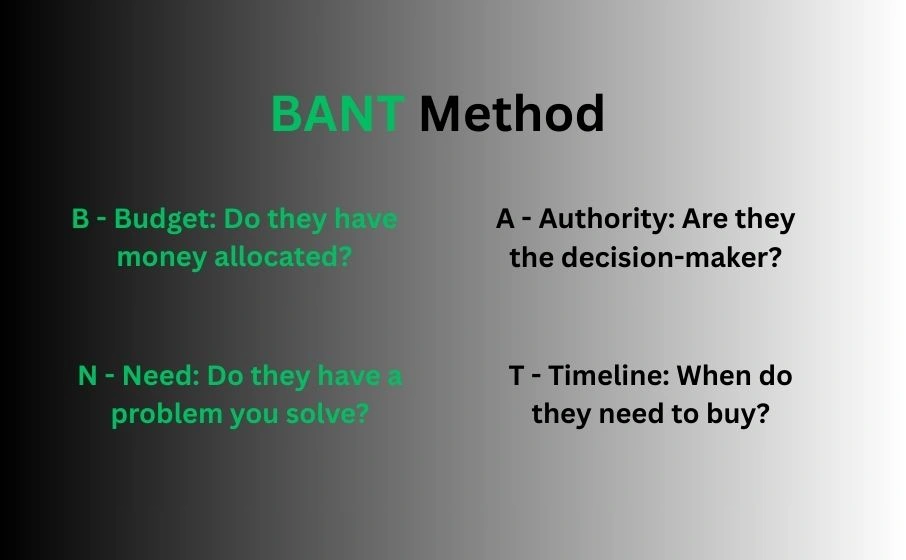
The Classic BANT Method
B – Budget: Do they have money allocated?
A – Authority: Are they the decision-maker?
N – Need: Do they have a problem you solve?
T – Timeline: When do they need to buy?
Modern BANT+ Framework (Expanded)
| Qualifier | Key Question | Qualification Threshold | Disqualification Signal |
| Budget | “What’s your budget range for solving this?” | Matches or exceeds your minimum | “We have no budget” / “Under $100” (when you’re $5K+) |
| Authority | “Who else is involved in this decision?” | They’re the sole decision-maker OR primary stakeholder | “I need to ask my boss/board/spouse first” |
| Need | “What problem are you trying to solve?” | Specific, urgent problem you solve | Vague, “nice to have,” or unrelated to your solution |
| Timeline | “When do you need this implemented?” | Within 90 days (or your sales cycle) | “Just researching” / “Maybe next year” |
| Fit | “What’s your [company size/industry/current situation]?” | Matches your ICP (Ideal Customer Profile) | Outside your target market completely |
| Urgency | “What happens if you don’t solve this soon?” | Clear consequences, pain point | “Nothing really, just curious” |
Your qualification bar: Prospects should score positively on at least 4 of 6 criteria, with Budget, Authority, and Need being non-negotiable.
The Cost: Manual vs. Automated Lead Qualification
Without Automation (Traditional Approach)
Typical sales rep’s week:
- 40 inbound leads
- 40 hours making initial contact calls (1 hour each including prep, call, notes)
- 10 qualify after initial conversation (25% qualified rate)
- 30 hours wasted on unqualified leads
- 10 hours spent on actual sales opportunities
Annual impact:
- 1,560 hours wasted (30 hrs/week × 52 weeks)
- At $75K salary = $56,250 in wasted labor
- Opportunity cost: Could have worked 156 additional qualified deals
With Automated Qualification
Automated system week:
- 40 inbound leads
- Automated questionnaire qualifies/disqualifies immediately
- 10-12 qualified leads surface (30% qualified rate due to better filtering)
- 0 hours on initial screening
- 2-3 hours on follow-up with qualified leads
- 37+ hours available for selling, closing, and relationship building
Annual impact:
- 1,924 hours saved
- Value: $69,120 in reclaimed productive time
- Plus: Higher close rate due to better-qualified pipeline
Automated Qualification Methods: Your Options
Method 1: Intelligent Qualification Chatbots
How it works: Website visitor initiates chat, bot asks qualifying questions before offering to connect them with sales.
Conversation flow example:
Bot: “Hi! I can connect you with our sales team. First, quick question: What brings you here today?”
Visitor: “I need help with [problem]”
Bot: “Great! We specialize in that. What’s your company size?”
Visitor: “50 employees”
Bot: “Perfect fit! What’s your timeline for implementation?”
Visitor: “Next quarter”
Bot: “Excellent. What budget range have you allocated?”
Visitor Options: Under $5K | $5K-15K | $15K-30K | $30K+
If budget matches: Bot: “Perfect! Based on your needs, you’d be working with our [appropriate tier]. Are you the primary decision-maker for this purchase?”
Visitor: “Yes” or “I’m one of three decision-makers”
Bot: “Great! I’m connecting you with [Salesperson Name] right now. They’ll reach out within 2 hours. In the meantime, check your email—I’m sending our [relevant case study].”
If budget too low or other disqualifier: Bot: “Thanks for your interest! Based on what you’ve shared, our [lower-tier solution] or [alternative resource] might be a better fit. Here’s information: [link]. Want to explore that?”
Best platforms:
- Drift ($400-1,500/month) – Advanced qualification routing
- Intercom ($74-395/month) – Qualification + CRM integration
- Qualified (Custom pricing) – B2B sales-focused qualification
- Tidio ($29-289/month) – Budget-friendly qualification
Real example:
CloudSoft Inc. implemented Drift qualification chatbot:
Before:
- Sales team fielded 120 monthly “inquiries”
- 82 were unqualified (small businesses, students, competitors researching)
- 38 were qualified (32% rate)
- Sales spent 60 hours monthly on initial qualification calls
After (90 days with automated qualification):
- Same 120 monthly inquiries
- Bot automatically filtered out 76 unqualified
- 44 qualified leads routed to sales (37% rate – better qualification)
- Sales spent 6 hours monthly on qualification follow-up
- 54 hours monthly reclaimed for actual selling
- Close rate improved from 18% to 29% (better-qualified pipeline)
Method 2: Progressive Web Forms
How it works: Multi-step forms that ask qualifying questions before booking meetings or requesting quotes.
Example form flow:
Page 1: “Let’s see if we’re a good fit! What industry are you in?” [Dropdown of industries you serve]
Page 2: “What’s your current [relevant metric—revenue, team size, website traffic]?” [Range options]
Page 3: “What’s your biggest challenge right now?” [Multiple choice of problems you solve + “Other”]
Page 4: “When do you need to solve this?” [This week / This month / Next 3 months / Just exploring]
Page 5: “What’s your budget range for solving this?” [Price ranges matching your tiers]
Page 6: “Who’s involved in making this decision?” [Just me / Me + 1-2 others / Committee of 3+ / Still determining]
If qualified: “Perfect! You’re exactly who we help. Book a time to talk: [Calendar link]”
If unqualified: “Based on your responses, we may not be the best fit right now. Here are some resources that might help: [Links to free content, DIY guides, or alternative solutions]”
Best tools:
- Typeform ($25-83/month) – Beautiful, conversational forms
- JotForm ($34-99/month) – Powerful conditional logic
- Leadformly ($37-74/month) – Conversion-optimized multi-step
- Formstack ($50-208/month) – Enterprise form automation
Method 3: Email-Based Qualification Sequences
How it works: Automated email series that asks qualifying questions over several days, scoring responses to determine qualification.
Example 5-email sequence:
Day 1 (Immediate): “Thanks for your interest! Quick question: What’s the main challenge you’re trying to solve?”
Day 2 (If they respond): “Thanks for sharing! That’s exactly what we help with. Quick question: What’s your timeline for getting this resolved?”
Day 3 (If timeline is reasonable): “Got it. To make sure we’re a good fit, what budget range have you set aside for solving this?”
Day 4 (If budget matches): “Perfect! One last question: Are you the primary decision-maker, or are others involved in this purchase?”
Day 5 (If qualified): “Based on everything you’ve shared, I think we can really help. I’d love to show you exactly how. Here are three times to chat: [Calendar links]”
Smart automation:
- If they don’t respond at any step → Move to nurture sequence (not sales-ready)
- If they give disqualifying answer → Redirect to appropriate resources
- If they qualify → Alert sales rep with full context for warm outreach
Best platforms:
- ActiveCampaign ($29-259/month) – Advanced automation + scoring
- HubSpot (Free-$800/month) – Lead scoring + CRM integration
- Drip ($39-1,999/month) – E-commerce qualification focus
Lead Scoring: Automated Qualification Ranking
Assign points to prospect behaviors and answers to automatically rank lead quality:
Sample Lead Scoring Model
| Action/Answer | Points | Qualification Value |
| Budget: Matches premium tier | +50 | High buying power |
| Budget: Matches mid-tier | +30 | Moderate buying power |
| Budget: Below minimum | -20 | Unlikely to close |
| Timeline: This month | +40 | Urgent, high intent |
| Timeline: Next 3 months | +20 | Moderate intent |
| Timeline: Just exploring | -10 | Low intent |
| Authority: Sole decision-maker | +30 | Fast close potential |
| Authority: 1 of 2-3 stakeholders | +15 | Normal sales process |
| Authority: Must get approval from many | -5 | Long, complex sale |
| Visited pricing page 3+ times | +15 | High buying interest |
| Downloaded case study | +10 | Researching seriously |
| Watched demo video | +20 | Understanding solution |
| Company size: In ICP range | +25 | Perfect fit |
| Company size: Too small | -15 | Poor fit |
| Industry: Target vertical | +20 | Industry expertise applies |
Automatic routing:
- 75+ points: “Hot lead” – Immediate sales outreach, high priority
- 40-74 points: “Warm lead” – Sales outreach within 24 hours
- 20-39 points: “Cool lead” – Automated nurture sequence
- Under 20 points: “Unqualified” – Educational content only
Building Your Automated Qualification System: Step-by-Step
Week 1: Define Your Qualification Criteria
Day 1-2: Analyze your closed deals
- Review last 20 customers
- What do they have in common?
- Budget range? Company size? Industry? Timeline?
- Create your Ideal Customer Profile (ICP)
Day 3-4: Analyze your failed deals
- Review last 20 lost opportunities
- Why did they not close?
- What red flags appeared early?
- Create your “Disqualification” profile
Day 5: Create qualification scorecard
- List 6-10 qualifying questions
- Define what answers = qualified
- Assign point values
- Set threshold scores
Week 2: Choose Your Technology
Day 6: Select primary qualification method
- Chatbot (for high website traffic)
- Web form (for lead magnets, quote requests)
- Email sequence (for email-captured leads)
Day 7-8: Platform selection
- Compare 3 platforms in your budget
- Check integration with your CRM
- Start free trials
- Test qualification flows
Day 9-10: Purchase and setup
- Subscribe to chosen platform
- Connect to website/CRM/email
- Configure basic settings
- Import contact data if applicable
Week 3: Build Qualification Workflows
Day 11-13: Create qualifying questions
- Write 6-8 key questions
- Create multiple choice answers where possible
- Add conditional logic (if answer X, ask question Y)
- Write disqualification messages
Day 14-15: Build automation flows
- Set up chatbot conversation paths
- Configure web form conditional logic
- Create email sequence with branching
- Set up lead scoring rules
Day 16-17: Integration and routing
- Connect qualified leads to sales CRM
- Set up sales team notifications
- Create calendar booking integration
- Configure automatic disqualification paths
Week 4: Test and Launch
Day 18-20: Internal testing
- Run through all qualification scenarios
- Test as both qualified and unqualified prospect
- Verify all integrations work
- Get sales team feedback
Day 21: Soft launch
- Enable for 25% of traffic
- Monitor closely
- Fix any issues immediately
- Adjust qualification criteria if needed
Day 22-28: Full launch and optimization
- Enable for 100% of leads
- Track qualification rates
- Monitor sales feedback
- Refine weekly based on results
Qualification Questions That Actually Work
Budget Questions (Ask Early)
❌ Bad: “What’s your budget?”
✓ Better: “Most clients invest between $5K-$15K for this solution. Does that align with what you’re planning?”
✓ Best: “Which range best describes your allocated budget? [Under $5K | $5K-$10K | $10K-$20K | $20K+]”
Why the best works: Gives context, provides ranges so they’re not guessing, easy to answer.
Authority Questions (Must Ask)
❌ Bad: “Are you the boss?”
✓ Better: “Who else will be involved in this decision?”
✓ Best: “When you’re ready to move forward, who needs to give final approval? [Just me | Me + 1-2 others | Committee/Board | Still determining]”
Why the best works: Assumes they’re moving forward (confidence), gets specific names/roles, identifies complex sales.
Timeline Questions (Urgency Indicator)
❌ Bad: “When do you want to start?”
✓ Better: “How soon do you need this implemented?”
✓ Best: “What’s driving the timeline for solving this? [Upcoming deadline | Current problem worsening | Proactive planning | Just exploring]”
Why the best works: Reveals true urgency and motivation, not just a date.
Need Questions (Problem Validation)
❌ Bad: “What do you need?”
✓ Better: “What problem are you trying to solve?”
✓ Best: “If you don’t solve [problem] in the next 90 days, what impact does that have on your business? [Significant revenue loss | Competitive disadvantage | Operational pain | Minor inconvenience]”
Why the best works: Quantifies pain, reveals priority level, separates urgent from nice-to-have.
Qualification Matrix: When to Talk vs. Nurture vs. Disqualify
| Budget | Authority | Need | Timeline | Action |
| ✓ Matches | ✓ Decision-maker | ✓ Strong fit | ✓ Next 90 days | TALK NOW – Hot lead |
| ✓ Matches | ✓ Influencer (not final) | ✓ Strong fit | ✓ Next 90 days | TALK SOON – Warm lead |
| ✓ Matches | ✓ Decision-maker | ✓ Strong fit | ? Just exploring | NURTURE – Build urgency |
| ✓ Matches | ✗ No authority | ✓ Strong fit | ✓ Next 90 days | QUALIFY FURTHER – Get decision-maker |
| ✗ Too low | Any | Any | Any | DISQUALIFY – Redirect to alternatives |
| Any | Any | ✗ Poor fit | Any | DISQUALIFY – Not your ICP |
| ? Unknown | Any | ✓ Strong fit | ✓ Next 90 days | QUALIFY – Ask budget question |
Case Studies: Real Qualification ROI
Case Study 1: SaaS Company ($250K+ ACV)
Before qualification automation:
- Monthly inbound leads: 80
- Sales calls scheduled: 80 (took anyone who asked)
- Qualified after 30-min call: 18 (22.5%)
- Hours wasted: 31 hours monthly (62 calls × 30 min)
- Close rate: 11% (2 closes from 18 qualified)
Implemented:
- Drift chatbot with BANT questions
- Lead scoring (budget + authority + timeline)
- Automatic calendar booking only for 75+ score
After 6 months:
- Monthly inbound leads: 85 (slightly increased)
- Automatically qualified by bot: 24 (28%)
- Sales calls scheduled: 24 (only qualified)
- Hours saved: 27.5 hours monthly
- Close rate: 25% (6 closes from 24 qualified)
Impact:
- 3x more closes (from 2 to 6 monthly)
- 88% time savings on qualification
- Sales team focused on closing, not screening
- Additional revenue: $750K annually from improved close rate
Cost: $6,000 annually (Drift subscription) ROI: 12,400%
Case Study 2: B2B Marketing Agency
Challenge:
- Receiving 40-50 monthly “I need a website” inquiries
- 80% had budgets under $2,000 (agency minimum: $10,000)
- Sales director spending 20+ hours monthly on calls going nowhere
Solution:
- TypeForm qualification quiz on “Get a Quote” page
- Questions: Project type, budget range, timeline, decision-maker
- If budget under $10K → Redirect to DIY resources + email course
- If qualified → Calendar booking + questionnaire sent to sales
Results after 3 months:
- Inquiries remained 40-50 monthly
- Auto-disqualified (budget too low): 32 average (64%)
- Qualified and booked: 15 average (30%)
- Sales calls dropped from 45 to 15 monthly
- Close rate: 47% (vs. 18% before) – much better fit prospects
- Sales director reclaimed 15 hours monthly
ROI:
- Average client value: $25,000
- Went from 8 monthly clients to 7 (1 less due to stricter qualification)
- But profit margin improved (less time wasted = more time serving clients well)
- Director had time to build referral network → 3 additional clients monthly from referrals
- Net result: 10 clients monthly (vs. 8 before), higher margins, happier team
Common Qualification Mistakes to Avoid
Mistake 1: Asking Questions Sales Reps Are Afraid To
Problem: Your automation asks “What’s your budget?” but your sales team never would (afraid of scaring prospects).
Result: Leads get qualified by automation, then sales doesn’t ask the hard questions again, wastes time on unqualified leads anyway.
Fix: Align sales process with automation. If budget matters, automation should ask AND sales should confirm.
Mistake 2: Disqualifying Based on One Factor
Problem: “Budget under $10K? Disqualified!” even if they have urgent need, authority, and timeline.
Why it fails: Sometimes budget is soft, can be expanded for right solution.
Fix: Use scoring system, not hard disqualification on single factor (except extreme cases).
Mistake 3: No Path for “Almost Qualified”
Problem: Black and white system: Qualified = sales call, Unqualified = nothing.
Why it fails: Many leads just need nurturing, will become qualified later.
Fix: Create three paths:
- Qualified now → Sales call
- Not qualified yet → Nurture sequence
- Never will be qualified → Educational resources + exit
Mistake 4: Qualifying Too Strictly
Problem: Set bar so high that even good leads don’t make it through.
Result: Sales team has nothing to do, complains about lack of leads.
Fix: Start with moderate qualification, tighten based on results. Aim for 25-35% qualification rate initially.
Mistake 5: Not Updating Based on Data
Problem: Set qualification criteria once, never review or adjust.
Why it fails: Market changes, your ICP evolves, automation becomes outdated.
Fix: Monthly review of qualification performance, quarterly criteria updates.
Advanced Qualification Tactics
Behavioral Qualification (Actions Speak Louder)
Instead of just asking questions, track behavior:
High-intent behaviors (increase qualification score):
- Visited pricing page 3+ times
- Watched full product demo video
- Downloaded ROI calculator
- Compared your plans/tiers
- Returned to site 5+ times in 7 days
Low-intent behaviors (decrease score):
- Only visited homepage
- Bounced after 10 seconds
- Clicked “Careers” page (might be job-hunting, not buying)
Tools: HubSpot, ActiveCampaign, Segment (track behavior and score)
Reverse Qualification (Let Them Qualify Themselves)
Instead of asking “Are you qualified?” show them who you work with:
Website copy example: “We work with established B2B companies (50+ employees) investing $15K-$50K in marketing annually to generate qualified leads through content and automation.”
Self-selection happens:
- Company with 10 employees, $2K budget → “Not for me” → Leaves
- Company with 100 employees, $30K budget → “Perfect fit!” → Inquires
Why it works: Saves everyone time, pre-qualifies before they even reach out.
Measuring Qualification Success
Key Metrics to Track
| Metric | How to Calculate | Target Benchmark |
| Qualification rate | Qualified leads / Total leads × 100 | 25-35% |
| Close rate (qualified) | Closes / Qualified leads × 100 | 20-30% (vs. 5-15% unqualified) |
| Time saved per week | (Unqualified leads × Avg call time) – Automation time | 10-20 hours |
| Cost per qualified lead | Total marketing spend / Qualified leads | Varies by industry |
| Sales cycle length | Days from qualified to close | Should decrease |
| Revenue per qualified lead | Total revenue / Qualified leads | Should increase |
Monthly Review Process
Week 1 of month:
- Pull qualification data from previous month
- Calculate qualification rate, close rate
- Review sample of qualified vs. unqualified leads
- Interview sales team: Are qualified leads actually qualified?
Adjust:
- If qualification rate under 20% → Loosen criteria
- If close rate under 15% → Tighten criteria (not qualified enough)
- If sales complaining → Review specific examples, adjust questions
Your 30-Day Implementation Roadmap
Days 1-7: Foundation
☐ Day 1: Analyze last 20 closed deals – common characteristics
☐ Day 2: Analyze last 20 lost deals – red flags
☐ Day 3: Define your BANT criteria specifically
☐ Day 4: Create lead scoring model
☐ Day 5: Research qualification platforms (3 options)
☐ Day 6: Start free trials of top 2 platforms
☐ Day 7: Choose platform, subscribe
Days 8-14: Build
☐ Day 8: Write 6-8 qualifying questions
☐ Day 9: Create answer options for each question
☐ Day 10: Build chatbot/form conversation flow
☐ Day 11: Set up qualification scoring/routing
☐ Day 12: Write qualified/unqualified responses
☐ Day 13: Connect to CRM and sales calendar
☐ Day 14: Test all pathways internally
Days 15-21: Test
☐ Day 15: Sales team tests as prospects
☐ Day 16: Fix any confusing questions/flows
☐ Day 17: Soft launch (25% of traffic)
☐ Day 18-20: Monitor, gather feedback
☐ Day 21: Refine based on early results
Days 22-30: Launch & Optimize
☐ Day 22: Full launch (100%)
☐ Day 23-30: Daily monitoring (15 min)
☐ Day 30: Week 1 review – qualification rate, sales feedback, adjustments
By Day 30: You’ll have working system qualifying leads automatically, saving 10-15 hours weekly, and improving sales team effectiveness dramatically.
Conclusion: Stop Talking to Tire-Kickers Tomorrow
Here’s the brutal truth: Every hour you spend on an unqualified call is an hour you didn’t spend closing a real deal.
The math is stark:
- 30 hours monthly on unqualified leads = 360 hours annually
- At $75K salary, that’s $27,000 in wasted time
- Opportunity cost: 30-50 additional deals you could have closed
Automated lead qualification isn’t about being selective or elitist. It’s about respect:
- Respect for your sales team’s time and expertise
- Respect for qualified prospects (who get faster, better service)
- Respect for unqualified prospects (honest guidance to appropriate solutions)
The businesses winning in sales aren’t working harder—they’re working smarter. They’ve built systems that automatically surface serious buyers while gracefully redirecting everyone else to appropriate resources.
Your First Step (Do This Today)
Choose one:
Option A (Fastest): Add 3 qualifying questions to your current contact form
- Budget range
- Timeline
- Decision-making authority
Option B (Most Impact): Start free trial of Drift, Intercom, or Typeform today
- Build simple 5-question qualification flow
- Launch in 72 hours
Option C (Cheapest): Create qualifying email sequence in your current email tool
- Day 1: Budget question
- Day 2: Timeline question
- Day 3: Authority question
- Day 4 (if qualified): Calendar booking
Whichever you choose, implement this week—not next month.
Your sales team is drowning in unqualified leads right now. Throw them the life raft of automation. Let them focus on what they do best: building relationships and closing deals with people who are actually ready to buy.
The question isn’t whether you can afford to automate lead qualification. It’s whether you can afford another week of your top salespeople wasting 30% of their time on prospects who were never going to close.
Stop talking to tire-kickers. Start closing serious buyers. Automate qualification this week.
Additional Resources: